Account Linking
Warning
Prerequisites:
Any code from the prerequisites can be omitted to make it easier to read. If you do want the complete code, look at the repository examples.
From your game
Linking the user account to your application require the user permission, so we will need to provide details when requesting permission. We will use DiscordAuthorizationArgs for this.
| GDScript |
|---|
 1
 2
 3
 4
 5
 6
 7
 8
 9
10
11
12
13
14
15
16
17 | extends Node
var application_id: int = 123456789012345678
var client := DiscordClient.new()
func _ready() -> void:
var args := DiscordAuthorizationArgs.new()
args.set_client_id(application_id)
args.set_scopes(DiscordClient.get_default_presence_scopes())
func _process(_delta: float) -> void:
Discord.run_callbacks()
|
client.set_application_id() vs args.set_client_id()
Did you noticed that I didn't use client.set_application_id()? Instead, I used args.set_client_id().
Later we will call client.connect_discord(), then Discord will look for the Application ID in client and args.
If you don't intend to call client.connect_discord() but still wants to use others features from the SDK, then client.set_application_id() is very useful (I don't know when is better to use args.set_client_id()).
I will not cover security details, so you just need to know that later we will use DiscordAuthorizationCodeVerifier to verify the response from Discord.
| GDScript |
|---|
 1
 2
 3
 4
 5
 6
 7
 8
 9
10
11
12
13
14
15
16
17
18
19
20
21 | extends Node
var application_id: int = 123456789012345678
var client := DiscordClient.new()
var code_verifier: DiscordAuthorizationCodeVerifier
func _ready() -> void:
var args := DiscordAuthorizationArgs.new()
code_verifier = client.create_authorization_code_verifier()
args.set_client_id(application_id)
args.set_scopes(DiscordClient.get_default_presence_scopes())
args.set_code_challenge(code_verifier.challenge())
func _process(_delta: float) -> void:
Discord.run_callbacks()
|
To request the user for permission we use client.authorize(), which should prompt the user for permissions in Discord (or browser if Discord is not open).
Warning
Linux: The SDK doesn't find the Discord from Flatpak/Snap, so it will always open the browser.
| GDScript |
|---|
 1
 2
 3
 4
 5
 6
 7
 8
 9
10
11
12
13
14
15
16
17
18
19
20
21
22
23
24
25
26
27
28
29
30
31 | extends Node
var application_id: int = 123456789012345678
var client := DiscordClient.new()
var code_verifier: DiscordAuthorizationCodeVerifier
func _ready() -> void:
var args := DiscordAuthorizationArgs.new()
code_verifier = client.create_authorization_code_verifier()
args.set_client_id(application_id)
args.set_scopes(DiscordClient.get_default_presence_scopes())
args.set_code_challenge(code_verifier.challenge())
client.authorize(args, _on_authorization_response)
func _process(_delta: float) -> void:
Discord.run_callbacks()
func _on_authorization_response(result: DiscordClientResult, code: String, redirect_uri: String) -> void:
if not result.successful():
print("❌ Authorization Error: %s" % result.error())
return
print("✅ Authorization successful! Next step: exchange code for an access token")
|
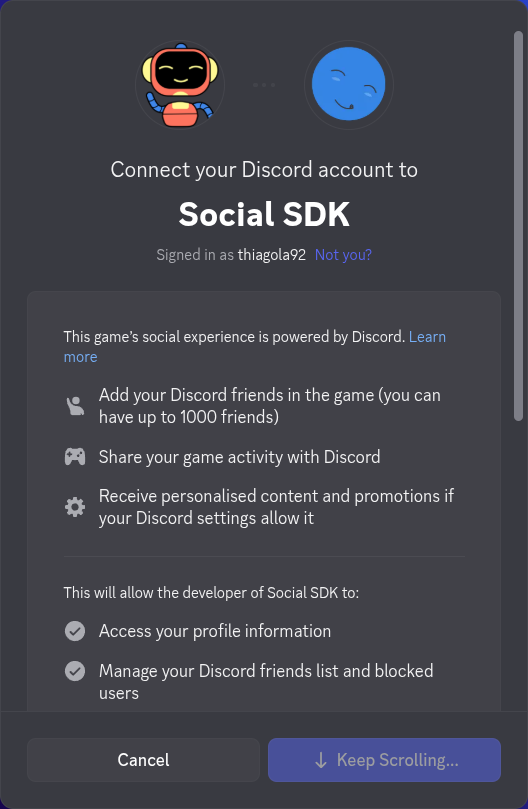
Now that we got permission from the user, we can continue with the security procedures to gain our token.
| GDScript |
|---|
 1
 2
 3
 4
 5
 6
 7
 8
 9
10
11
12
13
14
15
16
17
18
19
20
21
22
23
24
25
26
27
28
29
30
31
32
33
34
35
36
37
38
39
40
41
42
43
44
45
46
47 | extends Node
var application_id: int = 123456789012345678
var client := DiscordClient.new()
var code_verifier: DiscordAuthorizationCodeVerifier
func _ready() -> void:
var args := DiscordAuthorizationArgs.new()
code_verifier = client.create_authorization_code_verifier()
args.set_client_id(application_id)
args.set_scopes(DiscordClient.get_default_presence_scopes())
args.set_code_challenge(code_verifier.challenge())
client.authorize(args, _on_authorization_response)
func _process(_delta: float) -> void:
Discord.run_callbacks()
func _on_authorization_response(result: DiscordClientResult, code: String, redirect_uri: String) -> void:
if not result.successful():
print("❌ Authorization Error: %s" % result.error())
return
print("✅ Authorization successful! Next step: exchange code for an access token")
client.get_token(application_id, code, code_verifier.verifier(), redirect_uri, _on_token_received)
func _on_token_received(
result: DiscordClientResult,
access_token: String,
_refresh_token: String,
token_type: DiscordAuthorizationTokenType.Enum,
_expires_in: int,
_scopes: String
) -> void:
if not result.successful():
print("❌ Token Error: %s" % result.error())
return
print("🔓 Access token received! Establishing connection...")
|
Finally we will update our Discord client with the new token.
| GDScript |
|---|
 1
 2
 3
 4
 5
 6
 7
 8
 9
10
11
12
13
14
15
16
17
18
19
20
21
22
23
24
25
26
27
28
29
30
31
32
33
34
35
36
37
38
39
40
41
42
43
44
45
46
47
48
49
50
51
52
53
54
55
56 | extends Node
var application_id: int = 123456789012345678
var client := DiscordClient.new()
var code_verifier: DiscordAuthorizationCodeVerifier
func _ready() -> void:
var args := DiscordAuthorizationArgs.new()
code_verifier = client.create_authorization_code_verifier()
args.set_client_id(application_id)
args.set_scopes(DiscordClient.get_default_presence_scopes())
args.set_code_challenge(code_verifier.challenge())
client.authorize(args, _on_authorization_response)
func _process(_delta: float) -> void:
Discord.run_callbacks()
func _on_authorization_response(result: DiscordClientResult, code: String, redirect_uri: String) -> void:
if not result.successful():
print("❌ Authorization Error: %s" % result.error())
return
print("✅ Authorization successful! Next step: exchange code for an access token")
client.get_token(application_id, code, code_verifier.verifier(), redirect_uri, _on_token_received)
func _on_token_received(
result: DiscordClientResult,
access_token: String,
_refresh_token: String,
token_type: DiscordAuthorizationTokenType.Enum,
_expires_in: int,
_scopes: String
) -> void:
if not result.successful():
print("❌ Token Error: %s" % result.error())
return
print("🔓 Access token received! Establishing connection...")
client.update_token(token_type, access_token, _on_token_updated)
func _on_token_updated(result: DiscordClientResult) -> void:
if not result.successful():
print("❌ Token Update Error: %s" % result.error())
return
print("🔑 Token updated, connecting to Discord...")
|
Now that we setup our client with a valid token, we can finally start connecting to Discord.
| GDScript |
|---|
 1
 2
 3
 4
 5
 6
 7
 8
 9
10
11
12
13
14
15
16
17
18
19
20
21
22
23
24
25
26
27
28
29
30
31
32
33
34
35
36
37
38
39
40
41
42
43
44
45
46
47
48
49
50
51
52
53
54
55
56
57 | extends Node
var application_id: int = 123456789012345678
var client := DiscordClient.new()
var code_verifier: DiscordAuthorizationCodeVerifier
func _ready() -> void:
var args := DiscordAuthorizationArgs.new()
code_verifier = client.create_authorization_code_verifier()
args.set_client_id(application_id)
args.set_scopes(DiscordClient.get_default_presence_scopes())
args.set_code_challenge(code_verifier.challenge())
client.authorize(args, _on_authorization_response)
func _process(_delta: float) -> void:
Discord.run_callbacks()
func _on_authorization_response(result: DiscordClientResult, code: String, redirect_uri: String) -> void:
if not result.successful():
print("❌ Authorization Error: %s" % result.error())
return
print("✅ Authorization successful! Next step: exchange code for an access token")
client.get_token(application_id, code, code_verifier.verifier(), redirect_uri, _on_token_received)
func _on_token_received(
result: DiscordClientResult,
access_token: String,
_refresh_token: String,
token_type: DiscordAuthorizationTokenType.Enum,
_expires_in: int,
_scopes: String
) -> void:
if not result.successful():
print("❌ Token Error: %s" % result.error())
return
print("🔓 Access token received! Establishing connection...")
client.update_token(token_type, access_token, _on_token_updated)
func _on_token_updated(result: DiscordClientResult) -> void:
if not result.successful():
print("❌ Token Update Error: %s" % result.error())
return
print("🔑 Token updated, connecting to Discord...")
client.connect_discord()
|
After reading everything, you can see that is a chain of reaction until you can connect to Discord:
_ready()
└── client.authorize()
    └── client.get_token()
        └── client.update_token()
            └── client.connect_discord()
Refresh token
It's highly recommended to store when the access token expires (expires_in) and the refresh token (refresh_token) so you can update your access token without requesting permissions for the user again.
GDScriptfunc _on_token_received(
result: DiscordClientResult,
access_token: String,
refresh_token: String,
token_type: DiscordAuthorizationTokenType.Enum,
expires_in: int,
_scopes: String
) -> void:
if not result.successful():
print("❌ Token Error: %s" % result.error())
return
print("🔓 Access token received! Establishing connection...")
client.update_token(token_type, access_token, _on_token_updated)
References