Game Invites
Send
Warning
Prerequisites:
Any code from the prerequisites can be omitted to make it easier to read. If you do want the complete code, look at the repository examples.
Given that you made all prerequisites and your client status is ready, you can send an invite at any moment:
| GDScript |
|---|
 1
 2
 3
 4
 5
 6
 7
 8
 9
10
11
12
13
14
15
16
17
18
19
20
21
22
23
24
25
26
27
28
29
30
31
32
33 | extends Node
var application_id: int = 123456789012345678
var target_id: int = 987654323109876543
var client := DiscordClient.new()
func _ready() -> void:
client.set_application_id(application_id)
client.set_status_changed_callback(_on_status_changed)
func _process(_delta: float) -> void:
Discord.run_callbacks()
func _on_status_changed(status: DiscordClientStatus.Enum, _error: DiscordClientError.Enum, _error_detail: int) -> void:
var enum_str: String = Discord.enum_to_string(status, DiscordClientStatus.id)
print("Status changed to %s" % enum_str)
if status == DiscordClientStatus.READY:
var invite_message = "Join my game!"
client.send_activity_invite(target_id, invite_message, _on_activity_invite_sent)
func _on_activity_invite_sent(result: DiscordClientResult) -> void:
if result.successful():
print("✉️ Invite sent!")
|
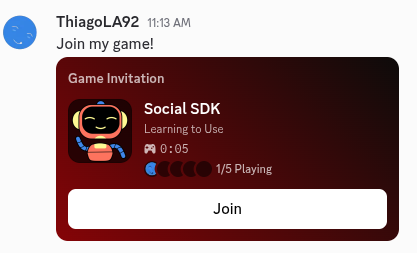
The other user will receive a direct message inviting to play.
Receive
You can configure for your game to be notified when the user receives an invite:
| GDScript |
|---|
 1
 2
 3
 4
 5
 6
 7
 8
 9
10
11
12
13
14
15
16
17
18
19
20
21
22
23
24 | extends Node
var application_id: int = 123456789012345678
var client := DiscordClient.new()
func _ready() -> void:
client.set_application_id(application_id)
client.set_activity_invite_created_callback(_on_activity_invite_created)
func _process(_delta: float) -> void:
Discord.run_callbacks()
func _on_activity_invite_created(invite: DiscordActivityInvite) -> void:
print("Activity Invite received from user: %s" % invite.sender_id())
var message: DiscordMessageHandle = client.get_message_handle(invite.message_id())
if message:
print("Invite Message: %s" % message.content())
|
Combining with the ability to accept invites, the user could do everything through your game:
| GDScript |
|---|
 1
 2
 3
 4
 5
 6
 7
 8
 9
10
11
12
13
14
15
16
17
18
19
20
21
22
23
24
25
26
27
28
29
30
31
32
33 | extends Node
var application_id: int = 123456789012345678
var client := DiscordClient.new()
func _ready() -> void:
client.set_application_id(application_id)
client.set_activity_invite_created_callback(_on_activity_invite_created)
func _process(_delta: float) -> void:
Discord.run_callbacks()
func _on_activity_invite_created(invite: DiscordActivityInvite) -> void:
print("Activity Invite received from user: %s" % invite.sender_id())
var message: DiscordMessageHandle = client.get_message_handle(invite.message_id())
if message:
print("Invite Message: %s" % message.content())
client.accept_activity_invite(invite, _on_activity_invite_accepted)
func _on_activity_invite_accepted(result: DiscordClientResult, join_secret: String) -> void:
if result.successful():
print("Activity Invite accepted successfully! Secret: %s" % join_secret)
else:
print("❌ Activity Invite accept failed")
|
Joined Notification
Your game can be notified whenever the user joined a party.
The advantage of configuring this, is that you will be notified whenever the user accept through the SDK (e.g. client.accept_activity_invite()) or Discord client (e.g. direct message).
| GDScript |
|---|
 1
 2
 3
 4
 5
 6
 7
 8
 9
10
11
12
13
14
15
16
17
18
19 | extends Node
var application_id: int = 123456789012345678
var client := DiscordClient.new()
func _ready() -> void:
client.set_application_id(application_id)
client.set_activity_join_callback(_on_activity_joined)
func _process(_delta: float) -> void:
Discord.run_callbacks()
func _on_activity_joined(join_secret: String) -> void:
print("Joined activity! Secret: %s" % join_secret)
|
Tip
Configure your game to be launchable and set this callback before running Discord.run_callbacks(). This way you can be notified that you joined right after the game finished opening.
References